Chord charts
Chord charts for the whole band, in any key
Chord charts on every phone and tablet: change key or capo, switch to Nashville Numbers, mark up your copy, and read in Dark, Paper or High contrast.
Flat per church, every volunteer included.
The Stand
One chart, four ways to read it.
The Stand turns any phone or tablet into the music stand: the whole set, every song in its key. A chart in Seteo is real text, not a picture of a page, so it can change to suit the person reading it.
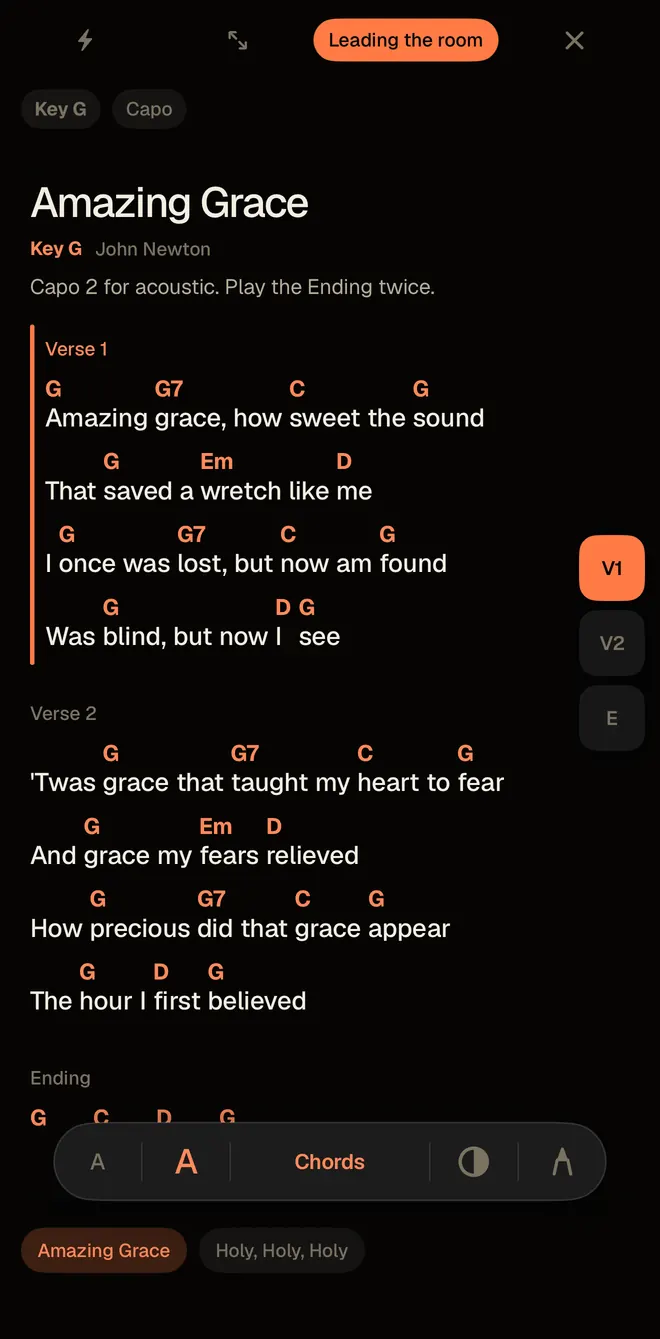
Chords
Chord letters sit over the words, right where the change lands. It’s what most of the band will read most weeks.
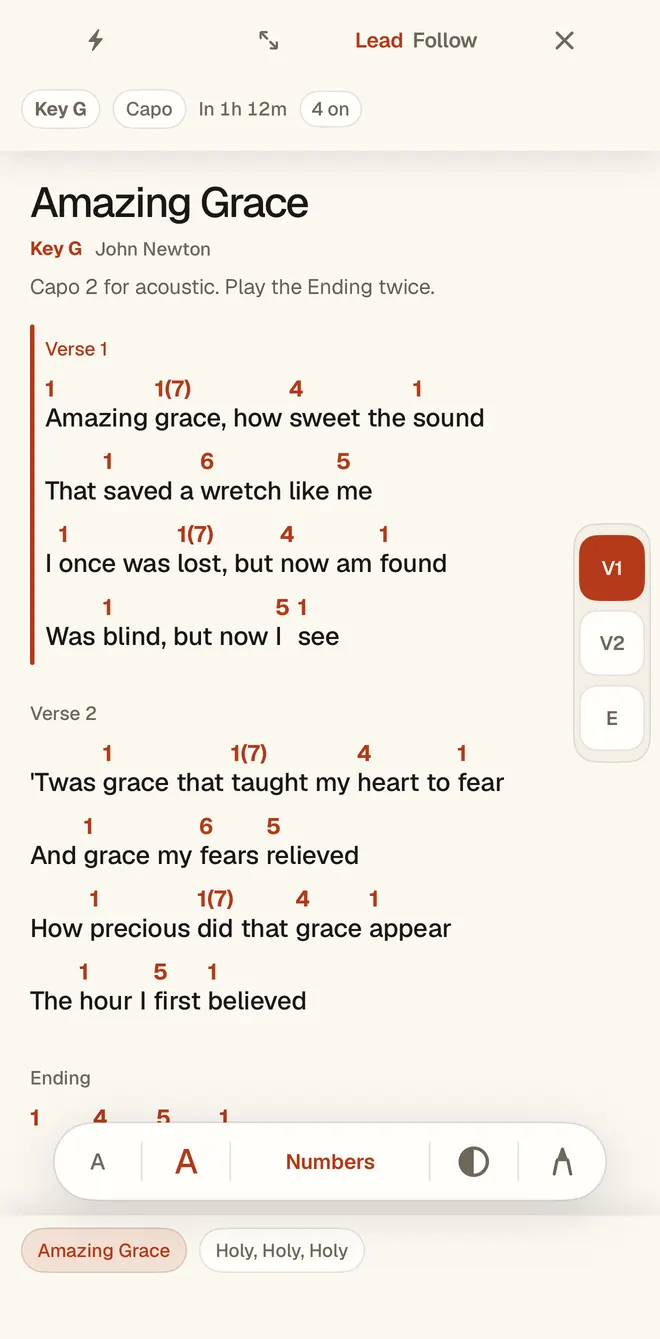
Numbers
The same chart in the Nashville Number System, so a change of key on Sunday morning changes nothing for the person reading it. One tap between the two, mid-song if you need it.
Grid
The song as a bar grid of numbers, four to a row, with the words out of the way.
Lyrics
Words only, for singers who want the page clear.
Any key, any capo
Sing it where your team sings it.
Pick a key and every chord follows, spelled the way that key spells it: B’s five is F♯, and D♭’s four is G♭. Set a capo and the Stand offers the frets that give open shapes, so a guitarist can play the song in G while the band stays in A.
A key or capo you choose on your Stand is yours, and it leaves everyone else’s chart alone. When the leader changes the key on the set, the team gets the new key.
Need one song in a new key right now, with nothing to sign up for? Paste it into the free chord transposer and Nashville Number converter.
Read it from a mic stand away
Exactly as big as it needs to be.
Text that reflows
Make the text bigger and the chart reflows instead of clipping. Nothing falls off the right edge in verse two.
Dark, Paper or High contrast
Dark for a dim room, Paper for a bright one, High contrast when the light is working against you. The Look stays on the device.
Two columns on a tablet
On an iPad or an Android tablet, a song can run in two columns, read like a hymnal spread. A short song leaves room for the next one to peek in, so the turn is already read.
Pen marks on your own copy
In the iPhone, iPad and Android apps, write on the chart. A mark belongs to its line, so it stays put when the text grows or the key changes. Your marks stay on your device and never reach anyone else’s Stand.
Lead the room
A leader can lead from their own Stand, and the phones set to Follow move with them, so nobody is lost when the bridge comes around again.
Getting your charts in
Real charts, not lyric sheets with letters sprinkled on.
From Planning Center
Seteo imports your songs from Planning Center, and you can keep using it. Here’s how the two compare.
From a PDF binder
Hand Seteo the PDFs and it hands back living charts, the kind that change key and reflow. You can check and correct any chart in the editor.
From a file or by hand
Upload ChordPro or CSV files, such as ones you download under your own SongSelect license, or add a song by hand.
Sharing
Yours to open, and yours to pause.
Your team gets the charts for the songs they’re playing, through their private link. On Whole Ministry, that same link can open the whole library for midweek practice: what they’re playing this week on top, watermarked and read-only.
That sharing is off by default. Your church turns it on, on the record, under its own music license, and can pause it any Saturday night.
Pricing
Flat per church. Every volunteer included.
No per-seat fees, ever. The set composer, chat edits, The Stand, and the volunteer loop are in every plan — you only move up for more teams and deeper insight.
Getting started. Flat per church, every volunteer included. $29 or $59 a month, charged when you subscribe. Cancel any time.
Before you ask
What about our CCLI license?
Your charts stay your charts, stored under your church’s own music license — like the binder on your piano. Sharing the library to volunteers is off by default; an admin turns it on, on the record, and can pause it anytime.
Do musicians need the app?
No. Each person’s private link opens the set on the Stand in any browser, with no login. The iPhone, iPad and Android apps add pen marks.
Does changing the key on my phone change it for the band?
No. A key or capo you choose on your own Stand changes your chart only. The key on the set is the one the whole team sees, and the leader sets it.
Can a guest read the charts?
Yes. A leader can send the set with one link or a QR code. The guest gets full charts on the Stand and nothing else, and the link retires itself after a week or two.